How to Use ChatGPT 80s Photo Filter: Step-by-Step Retro Prompts Guide (2026)
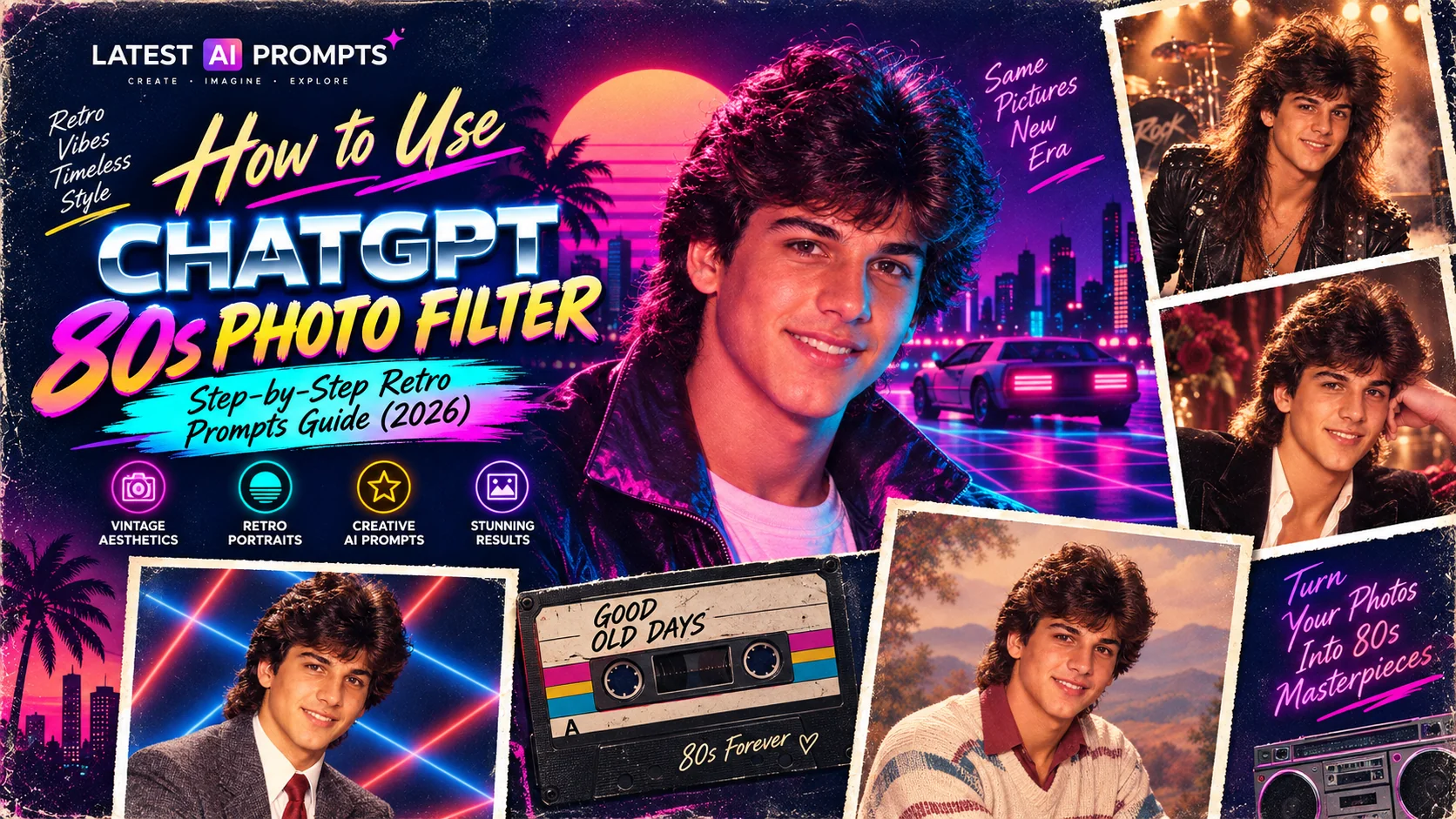
You've seen the stunning retro 80s portraits all over Instagram and WhatsApp — people transformed into laser-backdrop yearbook photos, neon-lit synthwave portraits, and glam mall studio shots from 1985. The question everyone is asking is: exactly how do you use ChatGPT as an 80s photo filter? This complete step-by-step guide answers that question in full. We'll walk you through every stage of the process: choosing the right photo to upload, opening and using ChatGPT (and the best free alternatives), writing or pasting the perfect 80s retro prompt, understanding why results sometimes miss the mark and how to fix them, and getting the most authentic-looking, viral-worthy retro portrait results possible. Whether you're a complete beginner who has never used an AI image generator before, or someone who has tried the trend but was frustrated with inconsistent results, this guide gives you the complete knowledge to succeed with the ChatGPT 80s photo filter every single time.
- Step-by-step tutorial — from photo selection to final share
- Best AI tools compared — ChatGPT, Gemini, Midjourney, Firefly
- Ready-to-paste prompts — the most popular 80s styles with full prompts
- Troubleshooting guide — why results fail and how to fix each problem
- Pro tips for authenticity — film stock, lighting, and era-specific prompt language
The ChatGPT 80s photo filter is not actually a filter at all — it is a prompt-driven AI image transformation. Unlike Instagram filters that apply a predetermined visual overlay to your photo, the ChatGPT 80s effect uses the AI's understanding of 1980s photographic aesthetics, styling conventions, and cultural visual language to generate an entirely new image based on your uploaded photo as a reference. This distinction matters because it means the quality of your result is directly proportional to the quality of your prompt. A generic, short prompt produces a generic, imprecise result. A detailed, culturally specific, technically accurate prompt produces a stunning, era-authentic portrait. This guide gives you both the knowledge to understand why that is, and the specific prompts you need to achieve the best results immediately.
How to Use ChatGPT as an 80s Photo Filter: Complete Step-by-Step Guide
Follow these six steps precisely for the best possible 80s retro portrait results from ChatGPT or any other AI tool:
Choose the Right Photo
The quality of your input photo is the single most important factor in determining the quality of your output. The ideal photo for the ChatGPT 80s photo filter has these characteristics: face clearly visible and centred in the frame, good lighting with no harsh shadows across the face, a neutral or simple background (the AI will replace it entirely), and minimum 800 pixels wide. A standard portrait or headshot in portrait orientation consistently outperforms full-body shots for this type of transformation. Avoid: dark photos, photos with heavy Instagram filters already applied, photos where multiple faces are visible, heavily edited photos, and photos taken from unusual angles. The AI needs clean, clear information about your facial features to carry them convincingly into the retro portrait.
Open Your AI Tool
For the standard ChatGPT 80s photo filter experience, go to chat.openai.com and log in or create a free account. Make sure you are opening a new conversation that has access to image generation — you will see an image icon in the chat input bar when DALL·E 3 is available. If you prefer not to use ChatGPT, the best alternatives are: Google Gemini at gemini.google.com (completely free, no generation limit, excellent Indian skin tone rendering), Microsoft Copilot Designer at copilot.microsoft.com (free, powered by DALL·E 3, slightly more conservative outputs), and Adobe Firefly at firefly.adobe.com (free trial, commercially safe outputs, strong fabric texture simulation). For the highest absolute quality, Midjourney (paid, from $10/month) consistently produces the most photorealistic retro portrait results.
Upload Your Photo Correctly
In ChatGPT, click the paperclip icon or the image icon at the left of the chat input bar. Select your chosen photo and wait for it to fully upload before typing anything — you will see a preview of the photo appear in the chat input. Do not send your photo without a prompt. In Google Gemini, click the image icon or simply drag and drop your photo into the chat window. In Adobe Firefly, use the “Generate Similar” or “Generative Fill” feature with your uploaded photo as a reference. In Midjourney, first share your image in Discord to get a URL, then use the /imagine command with [your-image-url] --iw 2 at the beginning of your prompt to set the image weight (how strongly the AI preserves your facial features).
Choose and Paste Your Prompt
After your photo uploads, paste your chosen 80s retro prompt into the chat. Never shorten or paraphrase the prompt — every element serves a specific purpose. You do not need to add any preamble like “transform this photo into” because the prompt below already includes that instruction. If you are writing your own prompt rather than using the ready-made ones below, include these four elements for best results: (1) the year and specific 80s sub-aesthetic (e.g., “1985 high school yearbook portrait”); (2) the specific background or setting (e.g., “laser yearbook backdrop”); (3) the lighting and film stock (e.g., “warm tungsten studio lighting, Kodak film grain”); and (4) a realism instruction (e.g., “photographic realism”). The more specific you are, the more authentic the result.
Generate, Review, and Regenerate
After submitting your photo and prompt, the AI will generate the 80s portrait in 15–60 seconds depending on the tool and server load. Review the result critically: Does it look like a photo from the 1980s? Does the background match the style you requested? Are the styling elements (hair, clothing, lighting) era-appropriate? If the result is not quite right, regenerate 2–3 more times with the exact same prompt — AI generation is probabilistic and results vary significantly between runs. The second or third generation often produces a dramatically better result. If after 4–5 generations the results are consistently missing the mark, see the troubleshooting section below for specific fixes.
Download, Edit, and Share
Download your generated 80s portrait at the highest available quality by clicking the download button in the interface. For the most engaging Instagram presentation, place it side-by-side with your original photo — original on left, 80s version on right — using free tools like Canva (free), Snapseed (free), or your phone's native photo editor. This before-and-after format is consistently the highest-performing format for this trend on Instagram. Optionally apply a subtle grain overlay in Snapseed's “Grainy Film” filter to deepen the vintage quality. Post as a carousel on Instagram (swipe format, highest algorithmic reach) with hashtags: #ChatGPT80s #80sPhotoFilter #RetroPortrait #AIPhoto #80sAesthetic.
Ready-to-Paste ChatGPT 80s Photo Filter Prompts
These are the prompts that consistently produce the most authentic and viral-worthy 80s retro portraits. Copy any of these exactly as written, paste it into ChatGPT after uploading your photo:
Prompt 1: Classic Laser Yearbook (Most Viral Style)
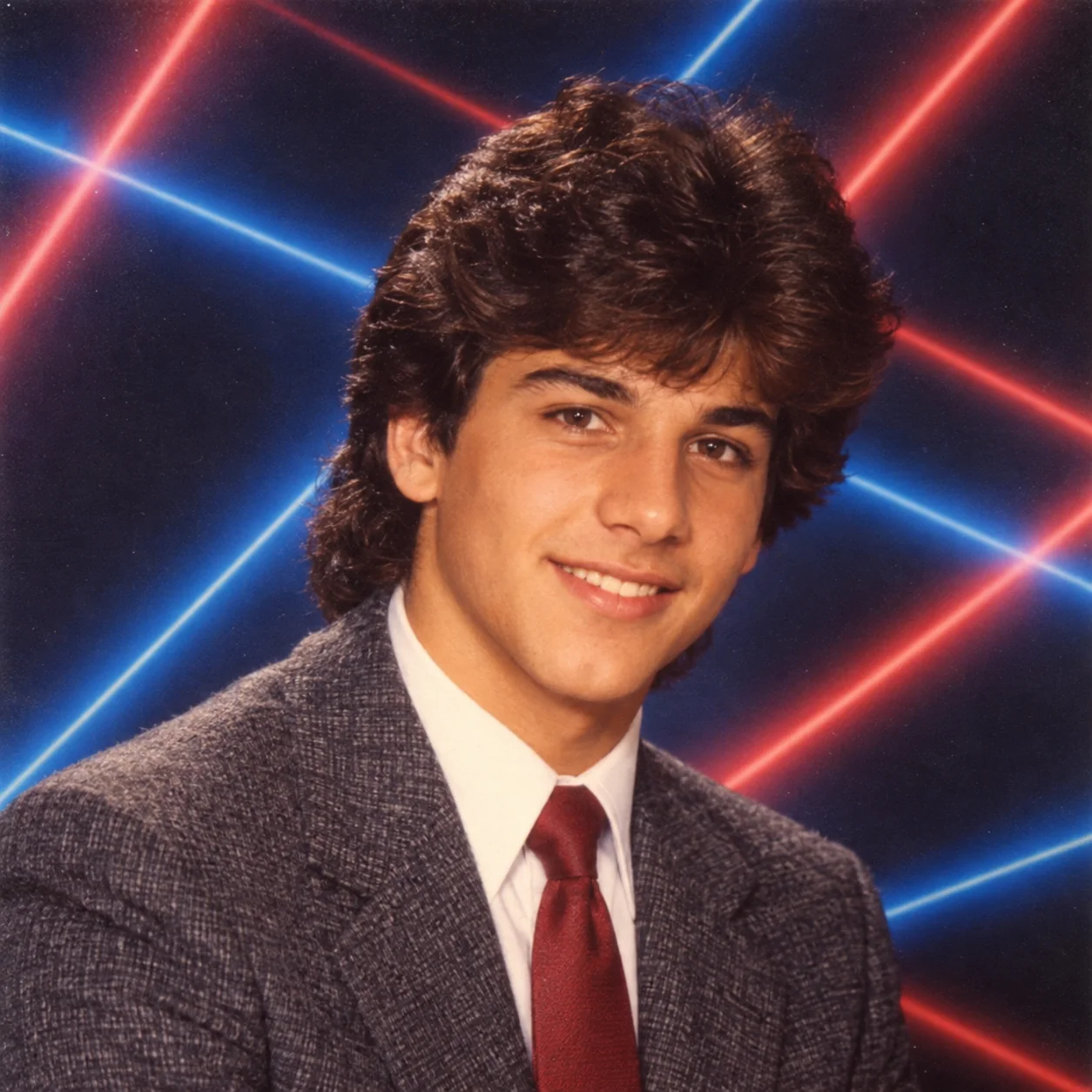
The laser yearbook backdrop is the single most recognisable and universally viral 80s photo style available. Lifetouch — the company that photographed school portraits for the majority of American schools throughout the 1980s — used this distinctive dark-background, coloured-light-beam setup for millions of school portraits. The visual recognition is instantaneous and triggers nostalgia even in viewers who never actually had their own laser yearbook photo taken. This prompt is the best starting point for anyone new to the ChatGPT 80s photo filter because it is reliably reproduced by every major AI tool and produces immediately recognisable results with high social media engagement.
Prompt 2: Neon Synthwave (Most Saved Style)
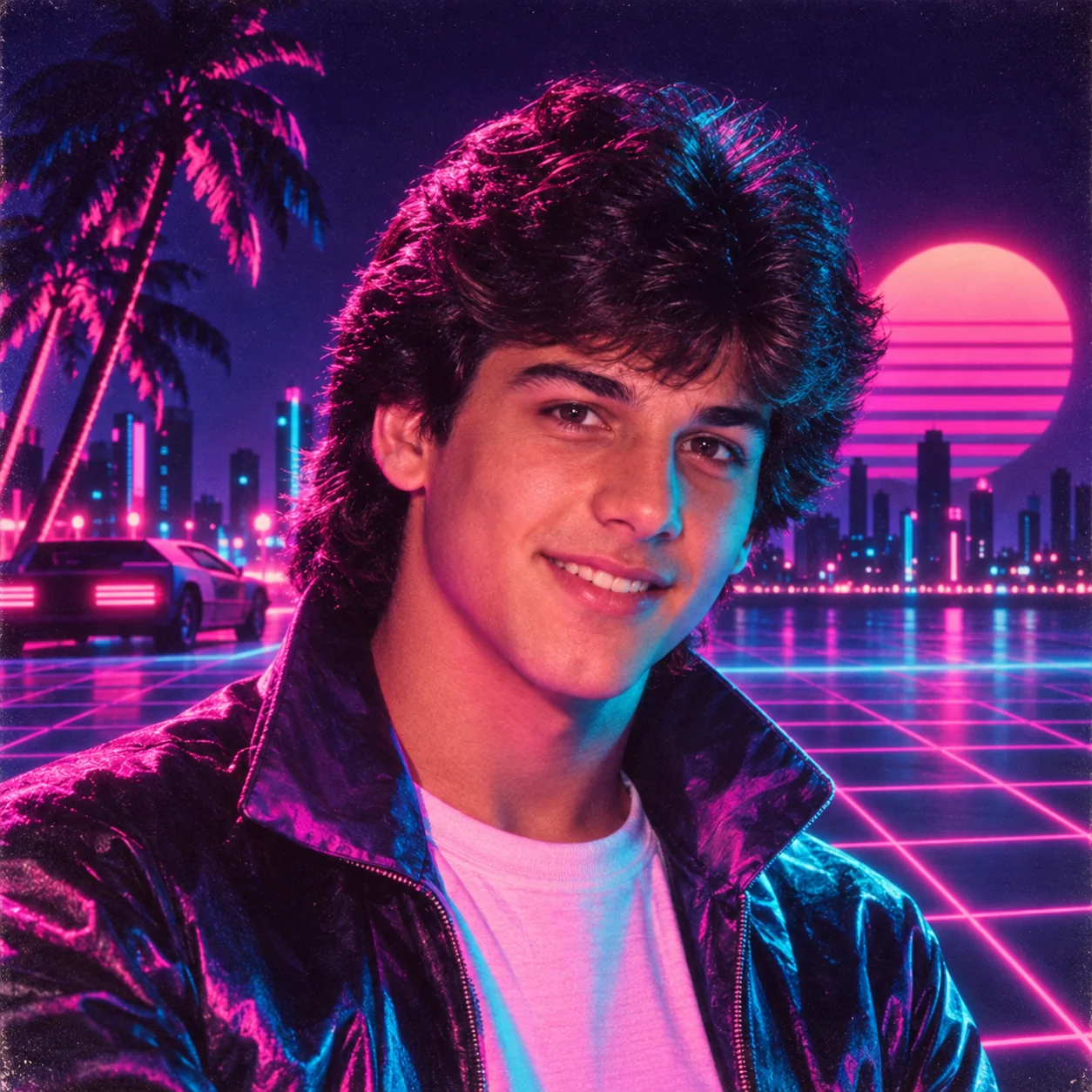
The neon synthwave portrait is the most aesthetically striking 80s style available — the vivid cyan-magenta palette creates images that genuinely stop people mid-scroll. This style draws from the visual language of Miami Vice, early music video production, and the 1980s' vision of a neon-lit technological future. The “retro-futurism” of this aesthetic — 1980s technology imagining what the future would look like, now viewed through our actual future — gives it a distinctive quality of nostalgic futurism that resonates powerfully with contemporary audiences who have grown up on synthwave music and retrowave aesthetics in gaming and popular culture.
Prompt 3: Mall Portrait Studio (Most Relatable Style)
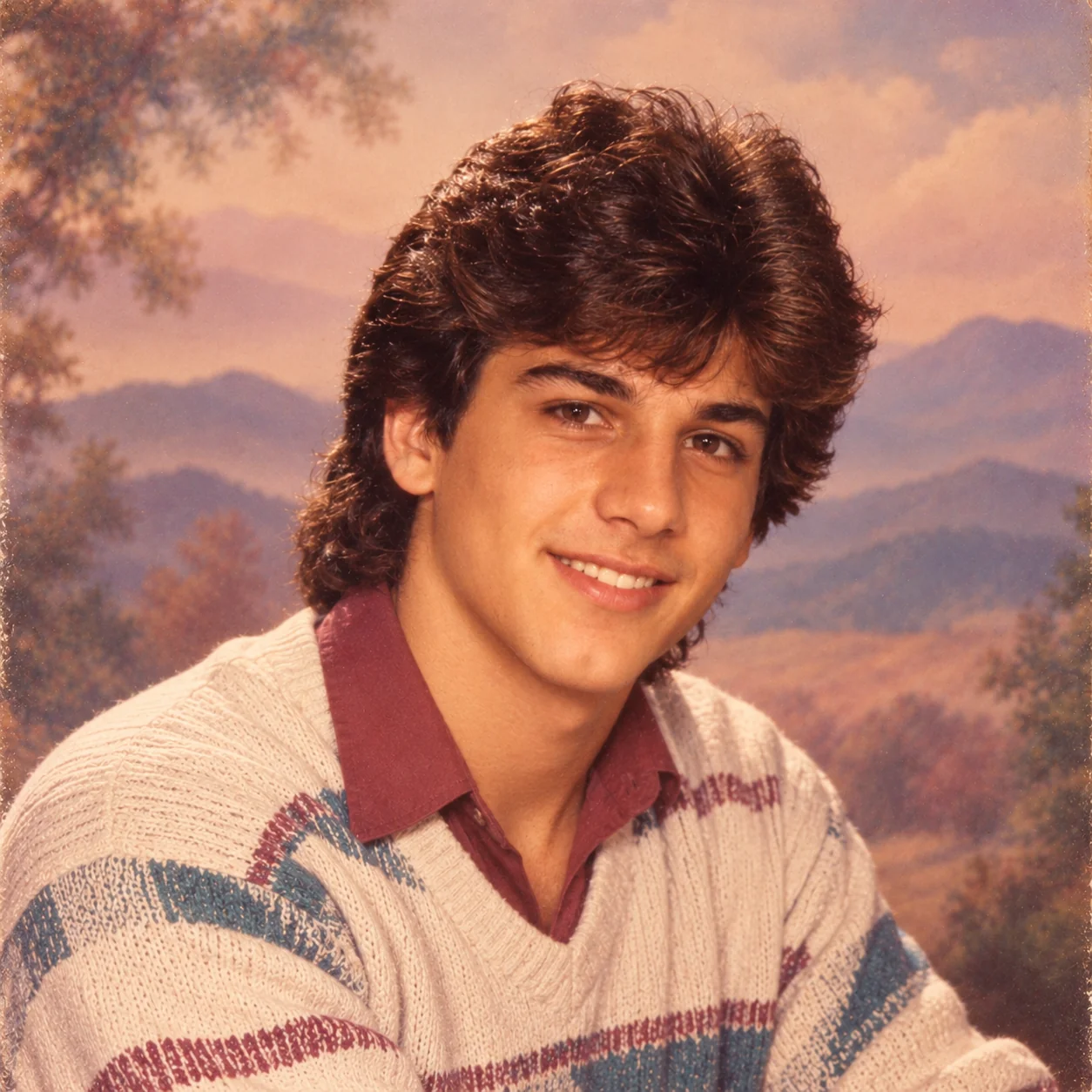
The mall portrait studio experience — Sears, JCPenney, K-Mart, and similar chain stores offering affordable portrait photography sessions at locations inside shopping malls — was a defining institution of middle-class American life in the 1980s. Virtually every American family has photographs taken in these studios somewhere in their family albums: those distinctive painted cloud-and-mountain backdrops, the warm golden light, the slightly stiff formal pose, and the particular colour cast of the era's photographic film. This prompt is the most emotionally resonant style for American audiences because it triggers genuine personal memories — and for non-American audiences, it communicates a charmingly specific cultural moment that has become widely recognisable through film, television, and social media.
Prompt 4: Hollywood Glamour (Most Aesthetic Style)
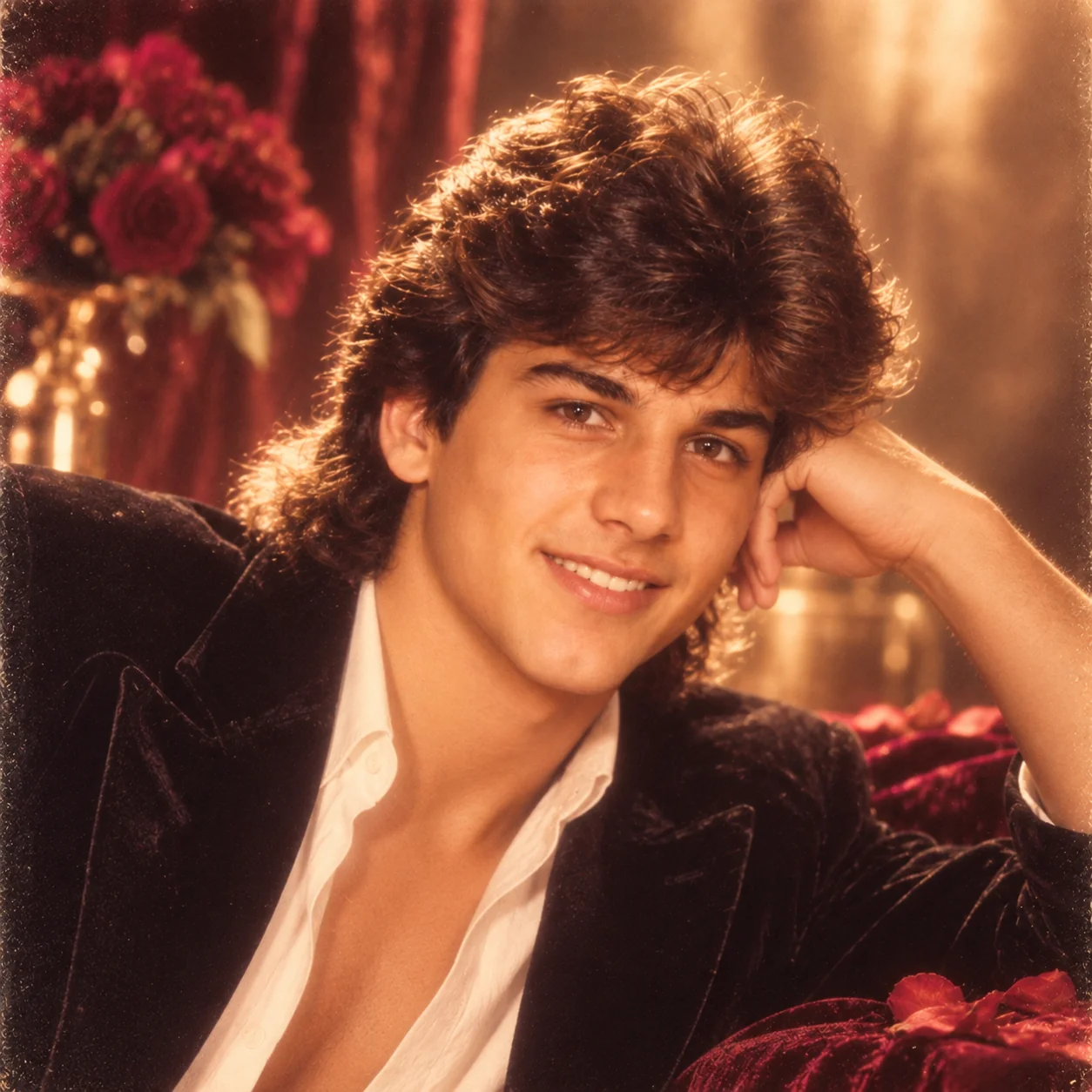
Herb Ritts was one of the defining portrait photographers of the 1980s, producing iconic images for Vogue, Vanity Fair, and the entertainment industry that defined a visual standard of glamour — the soft diffusion filter creating a dreamlike glow, high-key warm lighting that made subjects appear luminous, and a champagne-and-gold colour palette that communicated luxury and aspiration. This aesthetic is the most genuinely beautiful of all the 80s filter styles — it produces portraits that people actually want to keep and use as profile pictures rather than just share as a trend participation. The soft glamour photography tradition that Ritts represented reached into fashion, entertainment portraiture, and even commercial photography throughout the 1980s.
Prompt 5: Glam Rock Star (Most Entertaining Style)
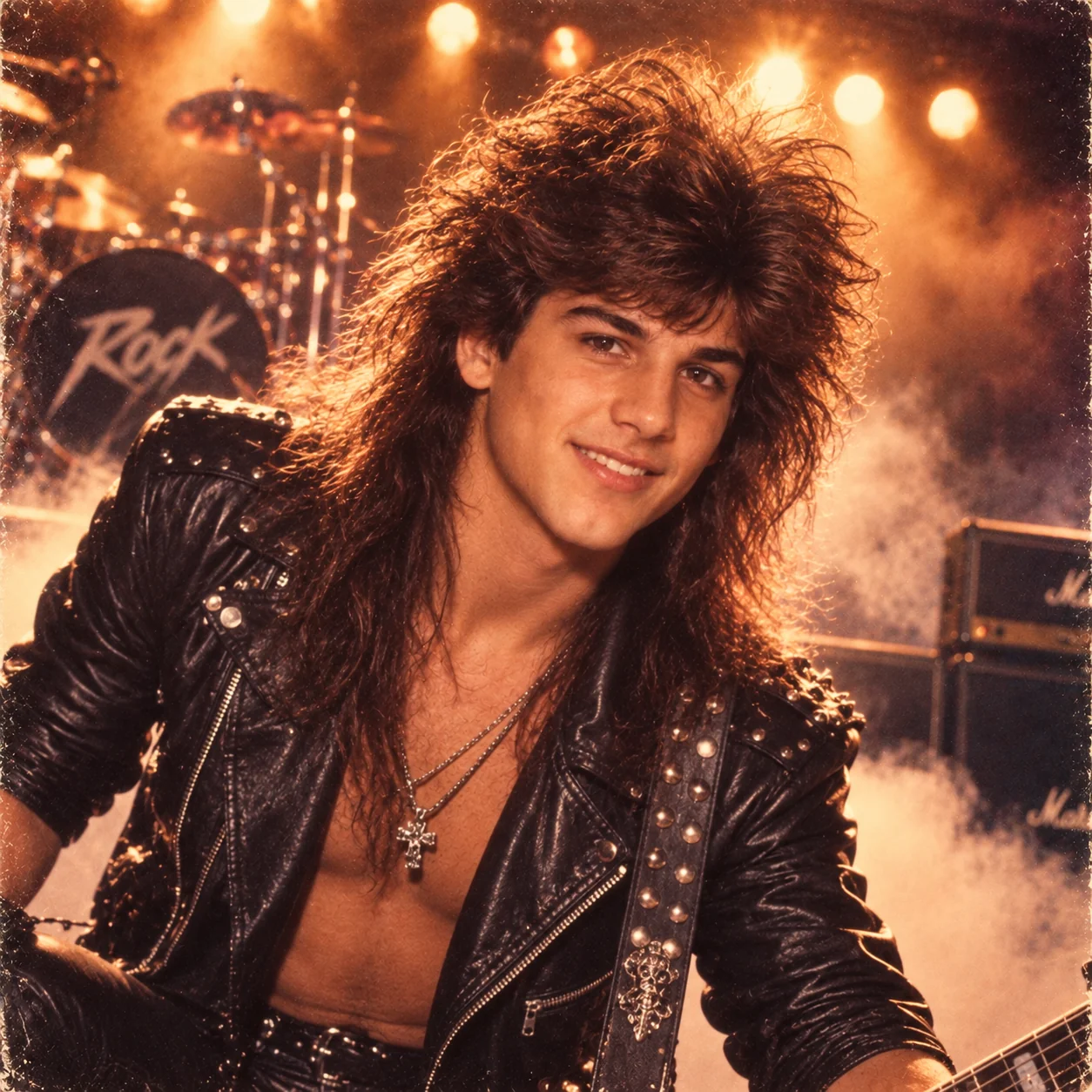
The glam metal promotional photo of the late 1980s was one of the most visually over-the-top photographic genres in American popular culture: bands like Motley Crue, Bon Jovi, Poison, and Whitesnake built entire visual identities around leather, studs, impossibly teased hair, fog machines, and amber concert lighting. The contrast between someone's ordinary 2026 selfie and the resulting over-the-top glam metal promotional portrait is precisely the kind of humorous juxtaposition that generates social media engagement — people share it with captions like “this is actually you” and “we were born in the wrong decade.” This style has the highest share rate of any 80s filter style due to its entertainment value.
Best AI Tools for the ChatGPT 80s Photo Filter: Compared
Not all AI tools produce the same quality of 80s retro portrait. Here is a precise comparison of the four major options, so you can choose the right tool for your specific goal:
ChatGPT (DALL·E 3)
Best for: Beginners, overall reliability, widest style range. Quality: Excellent colour rendering and background generation. Face retention: Good but variable — improves significantly with the phrase “maintaining exact facial features.” Cost: Free tier available with daily limit; ChatGPT Plus ($20/month) for unlimited. Tip: For best results, start a fresh conversation rather than continuing from a previous chat. The first generation in a fresh chat consistently produces better quality than generations in long ongoing conversations.
Google Gemini
Best for: Indian skin tones, jewellery detail, warm portrait rendering, free unlimited use. Quality: Very strong on cultural detail and warm photographic aesthetics. Face retention: Generally the best face retention of any free AI tool — Gemini reliably preserves the subject's recognisable facial features through the transformation. Cost: Completely free with no generation limit. Tip: Gemini is the recommended starting tool for anyone wanting Indian-aesthetic 80s portraits — Bollywood, traditional wedding, or regional styles — where accurate skin tone and jewellery rendering is important.
Midjourney
Best for: Highest overall visual quality, most cinematic results, most photorealistic 80s aesthetics. Quality: Significantly higher detail and photorealism than any free tool — the difference is immediately visible, particularly in fabric texture, lighting nuance, and facial detail. Face retention: Best with --iw 2 image weight flag. Cost: Paid, from $10/month (Basic plan). Tip: Use --ar 4:5 for Instagram-optimised portrait orientation, --style raw for the most photographic (least painterly) output, and --no cartoon, illustration, painting to avoid non-photographic outputs.
Adobe Firefly
Best for: Commercially safe outputs, fabric and textile texture rendering, professional use cases. Quality: Excellent fabric and material simulation — particularly strong for saree textures, embroidery detail, and velvet/silk backgrounds. Face retention: Good — the “Reference Image” feature allows you to set the weight of your reference photo independently. Cost: Free trial; Adobe subscription plans from $4.99/month. Tip: Use the “Structure Reference” slider at 70–80% to balance facial preservation with style transformation. Lower values give more stylistic freedom; higher values preserve more of the original photo's structure.
Troubleshooting: Why Your ChatGPT 80s Photo Isn't Working (And How to Fix It)
These are the most common problems users encounter with the ChatGPT 80s photo filter, with specific solutions for each:
Problem: “It doesn't look like me at all”
Cause: The AI generated a generic portrait rather than transforming your specific face. Fix 1: Add this phrase to your prompt: “maintaining the subject's exact facial features, skin tone, face shape, and eye colour from the reference photograph.” Fix 2: Ensure your uploaded photo has a very clear, well-lit, unobstructed view of your face — sunglasses, heavy makeup, extreme angles, and motion blur all reduce face retention accuracy. Fix 3: Switch to Google Gemini, which has the best face retention of free AI tools. Fix 4: In Midjourney, increase image weight to --iw 2.5.
Problem: “ChatGPT refuses to process my photo”
Cause: The AI flagged potential policy concerns with the image or prompt. Fix 1: Rephrase your prompt to use “a person in this photo” rather than any specific identity reference. Fix 2: Ensure your photo contains only yourself — remove photos with other visible people if consent is an issue. Fix 3: If the prompt itself is being flagged, simplify it — remove any potentially ambiguous phrasing and use only straightforward visual descriptors. Fix 4: If ChatGPT continues to refuse, use Google Gemini or Microsoft Copilot Designer, which have slightly more permissive content policies for personal portrait transformation.
Problem: “The result doesn't look like the 1980s”
Cause: The prompt was not specific enough to trigger era-accurate styling. Fix 1: Add a specific year to your prompt (e.g., “1985” or “1987”) — a specific year is more effective than “the 1980s” as a general reference. Fix 2: Add specific era-accurate styling: “big voluminous teased hair, 80s outfit, warm tungsten studio lighting.” Fix 3: Add a specific film stock reference: “Kodak Gold 200 film emulation, 35mm grain, warm vintage colour cast.” Fix 4: Add a specific photographic context: “Lifetouch portrait studio” or “JCPenney Photography studio” or “Stardust magazine editorial.”
Problem: “I hit my daily generation limit”
Cause: Free tier ChatGPT limits the number of DALL·E 3 image generations per day. Fix 1: Switch to Google Gemini (completely free, no generation limit) — paste the same prompt and get very similar quality results. Fix 2: Use Microsoft Copilot Designer (free, powered by DALL·E, resets daily limit independently of ChatGPT). Fix 3: If you want unlimited ChatGPT access, upgrade to ChatGPT Plus at $20/month for unlimited DALL·E 3 generation. Fix 4: Create a second ChatGPT account with a different email address to get a fresh daily limit (within OpenAI's terms of service for personal use).
Pro Tips for More Authentic 80s AI Photos
1. Use specific film stock names. Adding “Kodak Ektachrome film emulation” or “Fujifilm Velvia 50 colour rendering” triggers significantly more era-accurate colour rendering than general vintage descriptors. Each major film stock had a specific colour signature — Ektachrome for vivid saturated slides, Kodak Gold for warm portraits, Fuji Velvia for intense outdoor colours — and specifying the film stock name in your prompt produces noticeably more authentic results.
2. Add post-processing in Snapseed. After downloading your AI 80s portrait, open it in Snapseed (free app) and apply the “Grainy Film” filter at a strength of 15–25% with a warm tone bias. This adds organic photographic grain that is nearly impossible to replicate through prompting alone, and it significantly deepens the vintage photographic quality of the generated image.
3. Regenerate, don't rephrase. If your first generation is 80% correct but not quite perfect, regenerate with the same prompt rather than changing the prompt. AI generation is probabilistic — the same prompt produces different results each time — and the third or fourth generation of a good prompt often produces a dramatically better result than the first. Only change the prompt if you have regenerated 4–5 times and the results are consistently missing in the same specific way.
4. Use the before-and-after carousel format. On Instagram, the side-by-side or before-and-after carousel (original photo on slide 1, AI 80s portrait on slide 2 or more) consistently outperforms a single 80s portrait image by 3–4x in reach and engagement. The contrast between the two images is what generates the “wow” reaction that drives sharing and comments.
5. Post at the right time. In India, the highest engagement for nostalgia and viral content on Instagram is between 8–10 PM IST. In the US, it is between 6–9 PM EST. The 80s photo trend performs best in these evening windows when users are browsing relaxed and receptive to nostalgic content.

Jitendra Patra
AI Prompt Researcher & Software Engineering Student
Jitendra Patra is a software engineering student and AI prompt researcher specialising in Google Gemini and generative image models. He has tested the ChatGPT 80s photo filter trend extensively across ChatGPT DALL·E 3, Google Gemini, Midjourney, and Adobe Firefly, comparing results across hundreds of prompt iterations to identify exactly which prompt language, photo inputs, and tool settings produce the most authentic and viral-worthy retro portraits.
The step-by-step guide and prompts in this article represent the refined output of that comparative research, tested across different photo types, skin tones, lighting conditions, and 80s aesthetic sub-genres to produce universally applicable guidance for anyone wanting to participate in the viral 80s photo trend.
His research focuses on culturally specific AI prompt engineering, including Indian and South Asian aesthetic contexts in AI image generation, and the technical prompt language that produces the most authentic results for specific cultural and photographic traditions.
Frequently Asked Questions
Is ChatGPT 80s photo filter free to use?
Yes, the ChatGPT 80s photo filter effect is available on the free tier of ChatGPT, though free accounts have daily limits on DALL·E 3 image generation. If you hit the daily limit, free alternatives include Google Gemini (completely free with no generation limit), Microsoft Copilot Designer (free, also powered by DALL·E), and Adobe Firefly (free trial). ChatGPT Plus subscribers ($20/month) get unlimited DALL·E 3 access with priority processing.
Why does my ChatGPT 80s photo not look like me?
If the generated portrait does not resemble your face, the most common causes are: (1) The uploaded photo was not clear enough — use a well-lit, front-facing portrait; (2) The prompt did not include facial retention language — add “maintaining the subject's exact facial features, skin tone, and facial structure” to your prompt; (3) The AI tool has difficulty with face retention — switch to Google Gemini, which generally maintains facial features most accurately among free tools.
Which photo works best for the ChatGPT 80s photo filter?
The ideal photo has these characteristics: face clearly visible and centred, good lighting with no harsh shadows, a neutral background (the AI replaces it), and at least 800px wide. Headshots and portrait-orientation photos consistently outperform full-body shots for transformation quality. The cleaner and better-lit the original, the more detailed and accurate the AI retro portrait will be.
How do I make my 80s AI photo look more authentic?
To increase authenticity: (1) Add specific film stock language — “Kodak Gold 200 film emulation, 35mm grain”; (2) Specify the exact 80s setting — “Lifetouch yearbook studio” or “JCPenney portrait studio”; (3) Include era-specific lighting: “tungsten studio lighting”; (4) Request the characteristic colour grading: “slightly overexposed warm vintage colour cast”; (5) After generating, apply a subtle grain filter in Snapseed using the Grainy Film feature at 15–25% to deepen the vintage quality.
Can I use the ChatGPT 80s photo filter on someone else's photo?
You should only use the ChatGPT 80s photo filter on photos of yourself or on photos where you have explicit permission from the subject. Using AI to transform photos of other people without their consent raises significant ethical and potentially legal issues around privacy and consent. OpenAI's usage policies also prohibit generating images that use other people's likenesses without their permission. Always respect privacy and consent when using AI image generation tools.
Why does ChatGPT refuse to process my photo?
Common reasons for refusal include photos containing other people without given consent, photos that appear to be of public figures, or prompts that trigger content policy concerns. Fix: Rephrase your prompt to use “a person in this photo” and simplify to purely visual descriptors. If the issue persists, try Google Gemini or Adobe Firefly, which have slightly different content moderation approaches and may process the same request without issue.