How AI Video Generators Work: Everything You Need to Know in 2026
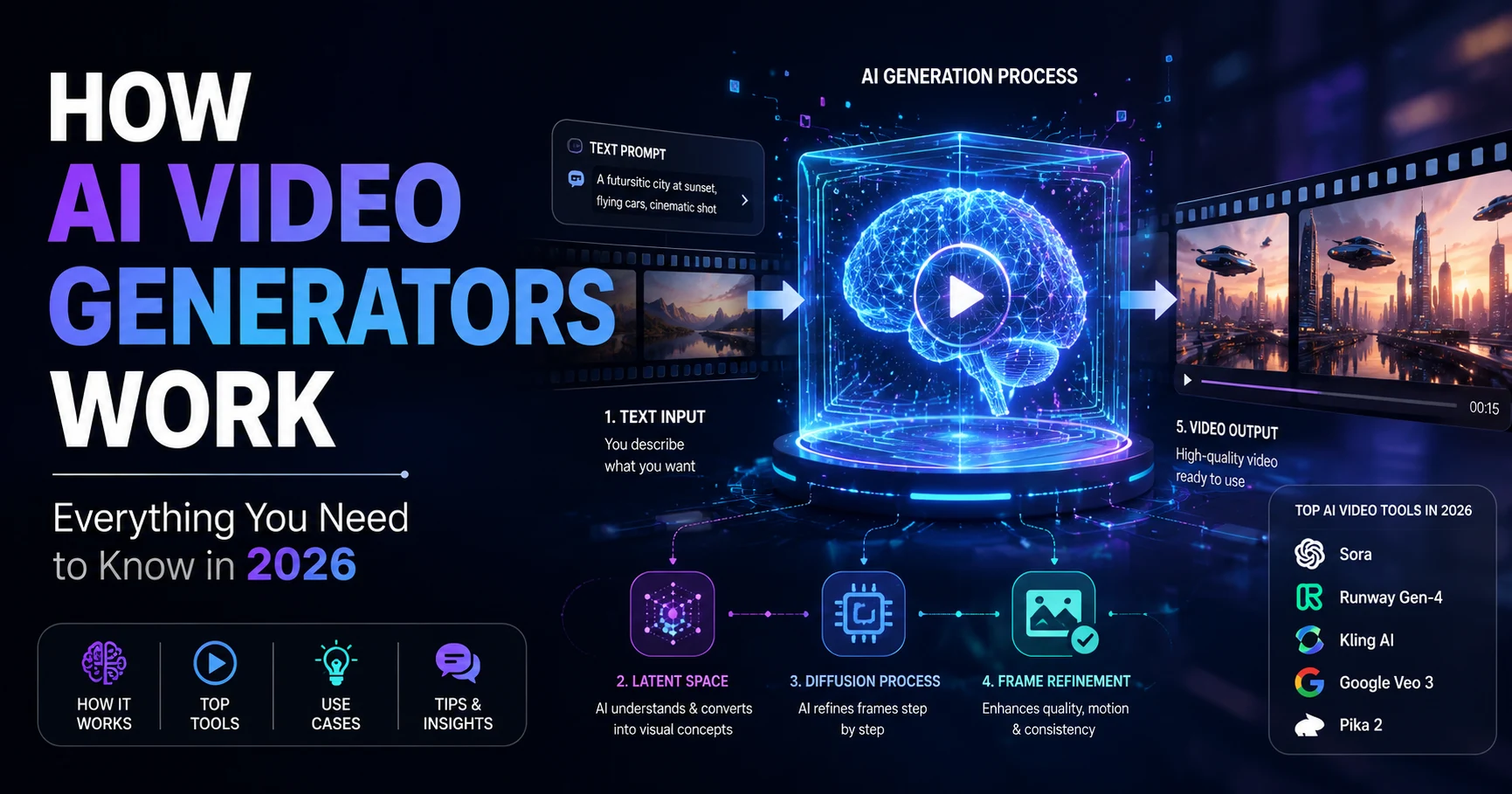
A few years ago, producing a professional video meant assembling a camera crew, booking a studio, spending hours in post-production, and writing a budget large enough to cover all of it. Today, a single typed sentence can produce a cinematic clip in seconds. That shift is not marketing hype - it reflects a genuine architectural revolution in the way computers understand and synthesise visual information across time.
AI video generators are now production-ready tools embedded in the daily workflows of marketing agencies, independent filmmakers, educators, and social media creators worldwide. The commercial market for AI-generated video content is expanding at a pace that is reshaping every industry that produces or consumes visual media.
But how do these tools actually work beneath the interface? What happens in the seconds between pressing "Generate" and seeing a finished clip appear on screen? And with so many competing platforms in 2026, which one should you actually use for your specific creative goal?
This guide answers every one of those questions. We cover the underlying architecture, the five-step generation pipeline, an honest comparison of the leading tools, real use cases across four industries, the limitations practitioners encounter daily, and the prompting principles that separate mediocre output from genuinely impressive results.
What Are AI Video Generators?
An AI video generator is a software system that creates video content - moving images, scenes, and often synchronised audio - automatically from a user's instruction. That instruction can take the form of a text description, a reference image, an existing video clip, or any combination of all three.
Unlike traditional video editing software, which requires you to supply all the visual assets and arrange them in a timeline, AI video generators synthesise the visual content entirely from scratch. The model draws on patterns learned from enormous datasets of existing video, imagery, and associated text descriptions to produce entirely new footage that matches your prompt.
The single most important thing to understand about AI video generators is that they do not retrieve footage from a database. They are generative models - they synthesise new pixels, new motion, and new visual sequences that have never existed before. This means the model must understand not just what objects look like, but how they move, how lighting evolves across time, how physics governs the interaction between objects in a scene, and how a viewer's eye should naturally travel through a composition.
That is an extraordinarily complex problem, and solving it is precisely why AI video generation has become one of the most technically demanding and commercially valuable research areas in artificial intelligence today.
From Blurry Clips to World Simulators: A Brief History
To fully appreciate where AI video generation stands in 2026, it helps to understand just how dramatically the technology has evolved in a compressed timeframe.
The Early Attempts (2021"“2022)
The first public text-to-video models produced short, low-resolution clips that were impressive by pure research standards but essentially unusable for any real creative purpose. Faces melted mid-scene. Objects appeared and vanished without apparent cause. Motion was jerky, and the physics routinely defied basic reality - people walked through walls, water flowed uphill, and backgrounds shifted unpredictably between frames. These early systems inherited U-Net-based architectures from image generation research and applied them clumsily to the additional dimension of time.
The Breakthrough Year (2023)
Research teams at Google, Meta AI, and a number of academic institutions began applying transformer architectures to video generation, directly addressing one of the critical weaknesses of earlier approaches: the inability to track objects and maintain visual consistency over longer sequences. Transformers, which excel at modelling long-range relationships in sequential data, proved far better suited to the problem of keeping a character's face consistent from frame 1 to frame 120.
The Public Explosion (2024)
OpenAI's Sora, announced in early 2024, dramatically reset public expectations for what AI video could achieve. Its demonstrations of physically coherent, cinematically composed clips up to one minute long stunned both the creative industry and the broader public. Runway Gen-3, Pika 1.0, and Kling AI all launched or significantly matured during this period, creating a genuinely competitive commercial market almost overnight.
Production-Grade Reality (2025"“2026)
By 2026, the conversation has shifted entirely. The question is no longer "can AI generate video?" but "how do we build a reliable, scalable production pipeline around it?" The leading tools - Sora, Runway Gen-4, Kling AI, Google Veo 3, and Pika 2 - now produce footage that is genuinely difficult to distinguish from traditional production in many contexts. The industry has moved from single-prompt generation toward structured, storyboard-led workflows where AI handles the most time-intensive parts of production while human directors maintain creative control.
How AI Video Generators Actually Work
Under the surface of every leading AI video generator in 2026 is a specific architectural combination that makes the entire process possible. Understanding this architecture gives you real insight into both the capabilities and the current limits of these tools.
The Foundation: Diffusion Transformer Models (DiT)
The dominant architecture powering modern AI video generation is the Diffusion Transformer (DiT). This combines two powerful ideas that individually drove revolutions in AI image generation.
The first is the diffusion model. Diffusion models are trained by taking real video data, gradually corrupting it with random noise until it becomes pure static, then learning to reverse that process step by step. Once trained, the model can begin with pure noise and "denoise" it - guided by a user's text description - to produce a coherent video that matches the prompt.
The second is the transformer architecture, originally developed for natural language processing. Transformers use a mechanism called self-attention that allows every element in a sequence to directly influence every other element. In video generation, this is critical: every frame must be aware of every other frame, and every pixel's motion must be consistent with the surrounding scene. Transformers handle this elegantly in ways that earlier convolutional approaches simply could not.
Earlier video models borrowed U-Net architectures from image generation. U-Nets process data in a hierarchical hourglass shape - encoding input to a compressed representation then decoding it back to full resolution. This works well for single frames but struggles with the added complexity of time. Diffusion Transformers process video as sequences of spatial-temporal patches and use self-attention to relate them all, producing far superior temporal consistency and physical coherence over longer clips.
Latent Diffusion: Making Generation Practical
Generating high-resolution video pixel-by-pixel at every denoising step would require astronomical computing resources. Modern AI video generators solve this through Latent Diffusion.
A neural network called a Variational Autoencoder (VAE) first compresses raw video frames into a much smaller latent space - a compact mathematical representation that captures essential visual characteristics (shapes, textures, motion patterns, colour relationships) while discarding easily-reconstructable detail. The entire diffusion process happens inside this compressed latent space rather than on raw pixels. Once generation is complete, the VAE decoder translates the result back into full-resolution video frames.
This compression typically reduces the data the model must process by a factor of 8 to 16, making it feasible to generate high-quality video on practical cloud hardware within seconds or minutes rather than hours.
Multimodal Input Processing
Early text-to-video models accepted only typed descriptions. Modern 2026 systems are genuinely multimodal, accepting and intelligently combining multiple input types simultaneously:
- Text prompts: Natural language descriptions of subject, action, environment, camera style, and mood.
- Reference images: Static images that anchor character appearance, environment aesthetic, or compositional framing.
- Existing video clips: Footage the model can extend, restyle, or use as motion reference.
- Audio tracks: Voice or sound recordings the model uses to synchronise visual content.
- Camera control parameters: Explicit instructions like "dolly left," "slow zoom out," or "handheld shake" that govern the virtual camera's movement.
This multimodal capability is the defining difference between 2026-era tools and their predecessors. You are no longer just describing a scene from nothing - you are assembling a rich creative brief from multiple sources that the model synthesises into a unified, coherent generation.
The 5-Step Generation Pipeline
When you click "Generate," a precise sequence of operations unfolds inside the model. Understanding this pipeline helps you make smarter creative decisions and diagnose results that don't match your expectations.
Multimodal Encoding
Your text prompt is converted into a dense mathematical embedding using a language encoder - typically a model similar to T5 or CLIP. If you provided reference images, a vision encoder processes them in parallel, generating embeddings that capture visual style, subject characteristics, and compositional framing. These embeddings collectively form the "creative brief" that steers the entire generation process from this point forward.
Noise Initialisation
The model initialises a block of pure random Gaussian noise in the latent space. This noise block has the exact shape required for the requested video - matching the target resolution, aspect ratio, and duration. Think of it as a four-dimensional canvas (width, height, colour channels, and time) filled entirely with randomness, waiting to be sculpted into meaning.
Guided Iterative Denoising
The Diffusion Transformer runs repeatedly over the noisy latent - typically between 20 and 50 denoising steps - progressively refining noise into structured content. At each step, it consults the embeddings from Step 1 to steer the denoising direction toward your intended output. Early steps establish broad composition, colour palette, and scene layout. Later steps refine surface details: textures, lighting transitions, fine character features. Temporal attention layers simultaneously ensure that motion in frame 1 is coherent with motion in frame 60 - the key mechanism behind smooth, physically plausible video.
Temporal Consistency Processing
Specialised temporal attention or 3D convolution layers explicitly compare every frame against its neighbours, penalising inconsistencies in subject appearance, lighting, and motion flow. Some models implement "seed locking" - a mechanism where a specific random seed anchors the visual identity of a character or environment across separately-generated clips, enabling multi-clip character consistency without requiring manual retouching between shots.
VAE Decoding and Audio Synthesis
The finalised latent representation passes through the VAE decoder, which translates it back into full-resolution video pixels. In tools with native audio capability (like Google Veo 3), a parallel audio generation model simultaneously synthesises matching sound effects, ambient environment noise, or basic dialogue, using the same text prompt and generated video frames as guidance. The result is a single unified output file - video and audio together - ready for immediate download.
Top AI Video Generators in 2026 Compared
One of the most significant shifts in the AI video landscape in 2026 is the end of the "one model to rule them all" era. Professional production teams now route different tasks to different models based on which tool excels at that specific requirement. Here is an honest breakdown of the leading platforms.
| Tool | Best For | Max Duration | Native Audio | Pricing Tier |
|---|---|---|---|---|
| Sora (OpenAI) | Cinematic storytelling, long scenes | Up to 60s | No | Premium |
| Runway Gen-4 | Professional editing control | 16s | Partial | Mid-range |
| Kling AI | Human motion, image-to-video | 20s | No | Affordable |
| Google Veo 3 | Prompt accuracy, native audio | 12s | Yes (full) | Mid-range |
| Pika 2 | Speed, social content, effects | 10s | Limited | Budget-friendly |
Sora by OpenAI
Sora remains the benchmark for high-end production where physical realism and narrative coherence are non-negotiable. Its ability to maintain consistent characters, plausible physics, and complex camera movements across clips of up to 60 seconds places it in a class of its own for storytelling applications. The trade-offs are cost and restrictive content policies. For marketing teams producing brand films or directors doing pre-visualisation work, Sora is frequently the tool of choice for final-quality renders where compromise on visual fidelity is not acceptable.
Runway Gen-4
Runway has distinguished itself not through raw generation quality alone, but by building the most capable creative workspace around video generation. Its motion brush tools allow you to paint specific movement directions onto regions of your scene. Camera pathing tools let you define precise virtual camera trajectories. Multi-aspect ratio support (16:9, 9:16, 1:1) makes it naturally suited for multi-platform publishing workflows. For creative directors who need iterative, controllable refinement rather than single-shot generation, Runway is the professional's preferred environment.
Kling AI
Kling AI has built a strong reputation as the most reliable tool for human-centric content. Its handling of facial expressions, natural body movement, and clothing dynamics is consistently rated as industry-leading at its price point. Where Kling particularly excels is its "first-and-last-frame" control - you specify exactly what the scene looks like at the start and end of the clip, and the model generates the motion in between. This is invaluable for e-commerce product demonstrations, portrait animation, and any workflow where precise compositional control matters more than cinematic ambition.
Google Veo 3
Veo 3 sets itself apart through native audio synthesis - it generates synchronised sound effects, ambient environment audio, and basic speech as part of the same generation pass as the visuals. This eliminates a substantial post-production step for many use cases. Its prompt adherence is also consistently rated among the highest of any platform, meaning what you describe in text maps more reliably to what actually appears in the generated video. For marketing teams producing product content or social media clips where audio matters, Veo 3 dramatically compresses the production chain.
Pika 2
When iteration speed and cost-per-clip are the primary decision metrics, Pika consistently leads the conversation. It generates usable clips in a fraction of the time required by premium tools, making it ideal for social media content where volume and freshness matter more than cinematic perfection. Pika's stylization effects - which can transform existing footage or generated clips into specific visual aesthetics - are a popular differentiator for content creators seeking to stand out without requiring high technical skill or a large budget.
Real-World Use Cases by Industry
AI video generation is no longer experimental. It is embedded in the operational workflows of businesses and creators across every sector that produces or consumes visual content. Here is how different industries are applying it in 2026.
Marketing & Advertising
Marketing teams have been among the earliest and most aggressive adopters of AI video. The core appeal is direct: AI dramatically reduces the cost and time associated with creating video ads, product demonstrations, and social content, while enabling teams to produce far more output from the same headcount.
- E-commerce product videos: Tools like Creatify generate polished product demonstration videos directly from a product URL, creating multiple format variants - 16:9 for YouTube, 9:16 for TikTok, 1:1 for Instagram - from a single generation session.
- A/B testing at scale: Teams generate dozens of creative variants from a single core concept, testing different visual approaches, tones, and messaging without commissioning multiple live-action shoots.
- Video localisation: AI avatar tools like HeyGen and Synthesia produce the same video in 40+ languages with realistic lip-syncing to translated audio, eliminating re-filming entirely for global campaigns.
- Content repurposing: Long-form assets like webinars and conference recordings are automatically segmented into short-form clips with AI-generated b-roll and captions, extracting months of social content from a single source asset.
Filmmaking & Entertainment
Professional filmmakers are integrating AI video into pre-production and post-production pipelines rather than using it as a replacement for traditional camera work. The focus is on eliminating expensive, time-consuming steps without sacrificing creative vision.
- Pre-visualisation: Directors rapidly convert storyboard sketches into animated sequences, enabling experimentation with camera angles, shot framing, and visual mood before principal photography begins. What once required weeks now takes hours.
- Concept art animation: Still concept art is animated using image-to-video tools, giving directors and producers a dynamic sense of how a scene will feel in motion before committing to costly live production.
- AI-hybrid production: Independent filmmakers produce short films that blend traditionally shot footage with AI-generated sequences for establishing shots, fantastical environments, or action scenes that would be prohibitive to film practically.
Education & Training
Educational institutions and corporate learning and development teams use AI video to produce consistent, professional instructional content at a fraction of the traditional production cost.
- Automated explainer videos: Dense lesson plans or compliance training scripts are converted into visually engaging explainer animations, dramatically increasing learner engagement compared to text-heavy alternatives.
- Multilingual course delivery: AI avatars deliver the same curriculum in multiple languages simultaneously, enabling global training programmes without proportionally larger budgets.
- Scenario simulation: Safety training, medical education, and regulatory compliance training increasingly use AI-generated video scenarios that can be customised for specific risk environments or organisational contexts.
Social Media & Content Creation
Individual creators and agency social media teams represent the broadest and fastest-growing user base for consumer AI video tools. The driving force is the insatiable demand for fresh, high-quality visual content across platforms that reward posting frequency.
- Faceless content channels: AI-generated video enables creators to produce high-quality educational or entertainment content without appearing on camera, dramatically lowering the barrier to consistent publishing.
- Trend participation: Fast tools like Pika allow creators to generate clips in trending visual styles within hours of a trend emerging, capturing peak engagement windows that would be impossible to hit with traditional production timelines.
- Animated intros and brand assets: Short animated branding segments are generated rapidly using AI rather than requiring motion graphics expertise or expensive contracted designers.
How to Write Better AI Video Prompts
The single most controllable variable in your AI video output quality is the precision and structure of your prompt. Most users frustrated with their results are not limited by the tool - they are limited by their prompts. Here are the core principles that separate consistently strong output from unpredictable mediocrity.
Structure Every Prompt in Four Layers
The most effective AI video prompts consistently address four distinct layers of information:
- Subject: Who or what is the primary focus of the scene? Be specific - not "a woman" but "a woman in her early 30s with short dark hair, wearing a tailored red jacket, standing with confident posture."
- Action / Motion: What is happening, and how is it moving? Not just "walking" but "walking slowly through fallen autumn leaves, her coat billowing gently in the wind with each step."
- Environment: Where is the scene set, and what does it look like? "A sun-drenched cobblestone lane in an old European town, golden late-afternoon light casting long shadows across the stone."
- Camera & Style: How should the viewer experience this visually? "Shot on a slightly shaky handheld camera, cinematic colour grade with warm tones, shallow depth of field with soft bokeh background."
Three Prompts That Consistently Deliver Great Results
A lone astronaut walks slowly across the rust-coloured surface of Mars at dawn, red dust swirling around their boots with each careful step. The distant sun rises low over the cracked horizon, casting a pale amber glow across the desolate landscape. Camera mounted low and close, wide-angle lens, slow push forward. Cinematic 2.35:1 ratio, ultra-realistic 4K, no music.
A sleek graphite laptop sits open on a minimal white oak desk. The screen glows with a clean, elegant dashboard. A hand enters frame from the right, presses a key, and the screen animates smoothly. Camera performs a slow, precise zoom into the screen. Soft diffused studio lighting, no hard shadows, shallow depth of field, 9:16 vertical format for mobile.
Smooth aerial drone footage gliding slowly above a vast ancient rainforest canopy at first light. Morning mist rises in wisps between the tallest trees. A single beam of golden sunlight pierces the canopy layer. Rich emerald greens, no people, no buildings. 16:9, photorealistic, atmospheric depth, slow and graceful movement throughout.
Mistakes That Consistently Ruin Results
- Vague motion: Writing "a beach scene" without specifying what is moving - waves, a person, a camera - produces near-static results. Always name the motion explicitly.
- Conflicting direction: Asking for "fast action" and "slow cinematic drone shot" in the same prompt creates confusion. Focus each generation on a single, coherent shot type.
- No camera language: Adding terms like "dolly in," "fixed wide shot," "handheld wobble," or "orbiting camera" dramatically improves the professional quality of output.
- Prompt overload: Extremely long prompts dilute the model's attention across too many details. Identify the 5-8 most critical elements and make those your focus.
Professional teams rarely rely on a single text-to-video generation. The most reliable 2026 workflow is: (1) Generate static reference images first using an image tool to lock in composition and character appearance. (2) Use those images as reference inputs in your video generation to maintain visual consistency across clips. (3) Generate multiple short clips per shot and select the best for assembly in an editing tool. This "storyboard-first" approach consistently outperforms attempting to generate a finished video in a single generation pass.
Current Limitations You Need to Know
For all its genuine advances, AI video generation in 2026 carries real, consistent limitations that professionals encounter daily. Understanding these helps you design workflows around them rather than into them.
Long-Form Character Consistency
Maintaining a character's appearance consistently across multiple separately-generated clips remains the most persistent production challenge. Seed locking helps, but subtle variations in facial structure, hair, and clothing texture frequently appear between clips. Most professional teams address this by generating significantly more clips than needed and curating the most consistent set for final assembly.
Fine Physical Details
AI video models continue to struggle with specific physical details requiring precise spatial understanding. Hands - with their complex arrangement of fingers and joints - frequently produce subtle artifacts in challenging poses. Text rendered within video frames (signs, labels, written words) is often illegible or inaccurate. Extreme facial close-ups in complex expressive motion sometimes reveal uncanny qualities that identify the content as AI-generated to attentive viewers.
Complex Multi-Person Interactions
Scenes featuring multiple distinct characters interacting physically - shaking hands, playing a sport together, having an emotionally expressive conversation - are significantly harder for current models than single-subject scenes. The model frequently struggles to maintain correct spatial relationships between people, leading to physically implausible positions or "merging" of subjects when they move into close contact.
Duration Limits and Narrative Arc
While Sora can generate clips up to 60 seconds, most leading tools top out at 8-20 seconds for high-quality output. More importantly, no current tool can reliably generate a coherent narrative arc within a single generation - sequences with cause-and-effect logic, character development, or evolving plot momentum. Longer stories must be carefully assembled from many shorter clips, each generated with deliberate attention to continuity.
Compute Cost and Generation Time
High-quality AI video generation remains computationally expensive relative to AI image generation. Generating a single 10-second 4K clip from a flagship model consumes significant cloud compute resources, translating to real costs per clip that accumulate quickly at production scale. Generation times range from a few seconds for fast tools like Pika to several minutes for the highest-quality outputs from premium platforms.
Content Policy Restrictions
All major AI video platforms enforce content policies that restrict certain categories of output - including realistic depictions of specific real individuals, graphic violence, and adult content. These policies vary between platforms and are enforced through automated classifiers that sometimes over-flag legitimate creative requests. Understanding each platform's policies before committing to a production workflow is essential to avoid mid-project disruptions.
The Future of AI Video Generation
The trajectory of AI video generation in 2026 is steep, and several developments visible in current research are shaping where the technology heads over the next two to three years.
Real-Time and On-Device Generation
Current AI video generation requires cloud computing infrastructure. Research into model distillation - creating smaller, faster versions of large models that retain most of their capability at a fraction of the compute cost - is advancing rapidly. Technologies demonstrating AI video generation on consumer-grade hardware are already emerging from academic research labs. Within two to three years, real-time AI video generation on professional laptops and eventually mobile devices is expected to become a practical reality, dramatically widening access beyond enterprise teams.
Agentic Video Production Workflows
The most significant near-term shift in AI video is the emergence of genuinely agentic production systems - where an AI director accepts a high-level creative brief and autonomously decomposes it into a storyboard, selects the optimal model for each shot type, generates all clips, assembles a rough cut, and presents it for human review and approval. Early closed-beta versions of these agentic workflows are already operating at several AI companies. Their public availability will fundamentally change what a one-person production team can achieve.
Physics-Accurate World Simulation
The research direction OpenAI introduced with Sora - treating video generation as a form of physical world simulation rather than a pattern-matching exercise - continues to advance across the industry. Models are increasingly being trained not only on video data but on physics engines and 3D simulation environments, giving them a progressively deeper understanding of how objects move, how light interacts with different surface materials, and how fluids, cloth, and rigid bodies behave under real-world constraints. This will further close the gap between AI-generated video and camera-captured reality.
Deeper, More Intuitive Creative Control
The industry is evolving from simple text-to-video prompting toward sophisticated multi-modal creative control systems. Future tools will support persistent world states that remember environments across multiple sessions, storyboard-to-video pipelines that maintain shot continuity automatically, and AI co-director interfaces that engage in iterative creative conversation rather than executing single discrete commands. The creator's role in the workflow evolves from "prompter" to "director" - setting creative direction while the AI handles execution.
Frequently Asked Questions
How do AI video generators work technically?
AI video generators use Diffusion Transformer (DiT) models that operate in a compressed latent space. They begin with random noise and progressively refine it - guided by your text and image embeddings - into a coherent video through 20-50 iterative denoising steps. Temporal attention layers ensure consistency across frames. Once generation is complete, a VAE decoder translates the latent representation back into full-resolution pixels ready for download.
Which AI video generator is best for beginners in 2026?
Pika 2 and Google Veo 3 are the most accessible starting points. Pika is fast, affordable, and has a straightforward interface ideal for social media experimentation. Veo 3's strong prompt adherence means what you type maps closely to what you get, reducing the learning curve considerably. Both offer free tiers that allow new users to experiment before upgrading to a paid plan.
Can AI video generators replace traditional videography?
Not completely - but they are displacing specific tasks within traditional production pipelines. AI excels at generating b-roll footage, pre-visualisation, product demonstrations, explainer animations, and high-volume social content. For documentary work, live events, and high-stakes hero content requiring real-world locations or people with emotional authenticity, traditional videography remains irreplaceable in 2026.
How much does AI video generation cost?
Costs vary substantially. Fast consumer tools like Pika offer free tiers with limited monthly generations, with paid plans starting around $8-15 per month. Professional platforms like Runway Gen-4 and Kling AI typically range from $15-50 per month for mid-tier plans. Enterprise-grade API access for high-volume production can reach hundreds to thousands of dollars per month.
Are AI-generated videos copyright-free?
This is an actively evolving legal area. In the United States, the Copyright Office has clarified that AI-generated content produced without meaningful human creative authorship is generally not eligible for copyright protection. However, the terms of service of the specific platform you use primarily govern your commercial use rights. Most major AI video platforms grant commercial use rights through paid plans.
Do I need technical skills to use AI video generators?
Not for consumer-grade tools. Every major AI video platform in 2026 provides a web interface where you type a description and click generate - no coding required. The skill that most reliably improves results is learning to write effective prompts, which is fundamentally a creative writing skill.

Jitendra Patra
AI Researcher & Software Engineering Student
Jitendra Patra is a software engineering student and AI researcher who writes in-depth guides on artificial intelligence tools, generative AI, and video generation technology. He covers topics including AI video generators, diffusion models, and practical AI workflows.
His work focuses on making complex AI concepts accessible - from how diffusion transformer architectures work under the hood to how creators can use AI video tools effectively in 2026.
This guide draws on published model documentation from OpenAI, Google DeepMind, Runway, and Kling AI, and industry practitioner reporting as of August 2026.